Add files
Select Version of EA Desktop:
The New Item Catalog module has a couple of options for adding a file to Exploration Archives during the cataloging process:
- Drag and drop
- Add files or directory options from the grid menu
Files are any form of consumable seismic product and are available online, offline or nearline.
Adding a file to Exploration Archives auto-generates a File ID in the Files grid. At the same time, the original file in the originating directory will be renamed with the File ID appended as a prefix to the name.
Click on the heading to expand the topic:
 Adding files with drag and drop
- Navigate to the location of your file.
- Click then drag and drop the file to the Files grid.
The file automatically loads to the grid with an auto-generated File ID - Select, or enter, the details for the relevant columns.
- Click Save.
Adding files using the Add button
-
In the Files panel, click Add and select the item type to add:
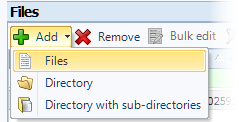
- Files
- Directory
- Directory with sub-directories
- Navigate to the item you are adding. Select and click Open or Select Folder. The item adds to the grid and auto-populates the File ID, File Size and Original File Name and Trimmed Location.
- Select, or enter, the details for the relevant columns.
- Click Save.